


Muzio I Music Player & MP3 App
3.546.73K Reviews
App Specs
- Version
- 7.8.4
- Updated On
- License
- Free
- Downloads
- 100,000,000+
- Developer
- Red Sky Labs
- Categories
- Music & Audio
- Platform
- Android
Screenshots

 Analysis by AppCompare
I find the most useful question to ask about a phone music player is not whether it has a long feature list, but whether I can get to the right track comfortably when my attention is elsewhere. That matters when I’m walking, cooking, or trying to settle down with a familiar album. Music Player - MP3 Player is a free music and audio app from Red Sky Labs, built around playing music stored on a device rather than replacing a streaming subscription. Its appeal is straightforward: local listening, library organization, and sound controls in one place.
Readable screens and familiar navigation
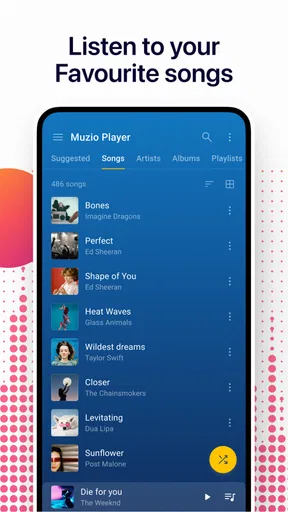
The app’s library is organized around common ways of thinking about a music collection, including albums, artists, and playlists. I like that because it offers more than one route to a song: I can look for an album when I remember its cover or browse by artist when I’m in the mood for a particular catalogue. The simple layout described in the app’s design makes this kind of routine browsing less demanding than digging through folders in a file manager.
That structure is especially useful for people who already keep music files on their phones. A streaming app often puts search, recommendations, and online catalogues at the center; here, the practical starting point is the collection you have available. If your library has sensible tags, browsing by artist or album can be quicker than repeatedly typing song titles. If those tags are inconsistent, however, the same organization can feel messy, so I’d tidy the metadata on a computer before expecting the library views to do all the work.
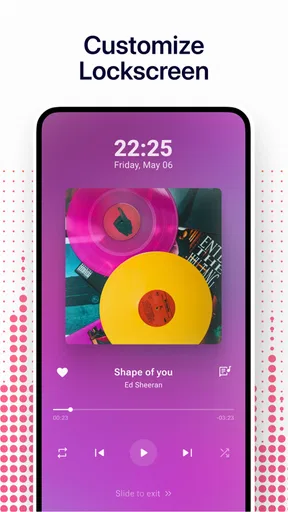
Theme and background customization can make the interface feel more personal, and it may help some listeners choose a look they find easier to follow. I treat that as a comfort option, not a substitute for genuinely adjustable text or contrast. If small controls or dense screens are difficult for you, it’s worth checking the app on your own phone before moving a large collection into it. A screen that feels clear at home may be harder to scan outdoors or when you are tired.
Controls, sound, and different ways of listening
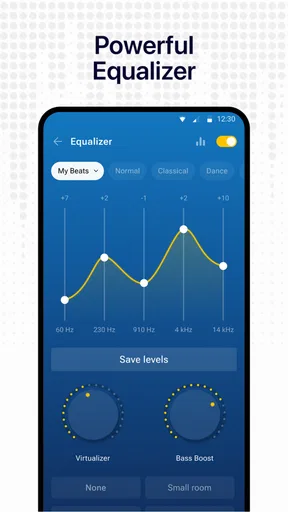
Sound shaping is one of the more useful parts of this player. The built-in equalizer offers genre presets, while manual adjustments let me change the balance instead of accepting a single default sound. I’d start with a preset and make small changes rather than pushing several controls to extremes: that makes it easier to tell whether a tweak is helping vocals, bass, or a particular pair of headphones. The bass booster can add weight, but it is not automatically an improvement; on some speakers or earbuds, too much bass can make the rest of the mix harder to hear.
That flexibility can be helpful for listeners who use different headphones in different places, or who find that a collection of older recordings varies in loudness and tone. It is still a listening adjustment, not a guarantee that every track will sound equally clear. I’d keep the phone volume at a comfortable level and make changes gradually, especially if you listen for long stretches. The best setting is the one that makes the music easy to follow without turning up the volume to compensate for an unbalanced mix.
There is an important distinction between local playback and music access. The app can play files already on the device, which is handy when a connection is unreliable, but that does not mean it supplies a catalogue of songs to stream. You need to have music available on the phone first. For someone who wants instant access to newly released tracks without managing files, a streaming service is the more natural fit; for someone with a carefully kept offline collection, a dedicated player can be simpler and less dependent on mobile data.
Worth Reading Before You Choose

Flipboard Shows What News Apps Must Do Beyond the Feed

Switching to Android Auto Means Rethinking Your Driving Routine

Google Calendar Makes a Crowded Week Easier to Manage

Ludo King Makes the Most of the Minutes Between Plans

Baby Panda World Brings Quick Play to Modern Phones, but Its Game Library Feels Busy

ESPN’s Live Game View Makes Following Close Games Easier
Practical listening beyond the sofa
A realistic use case is a commute through areas where signal drops in and out. I can prepare a playlist from music already on the phone, start it before leaving, and let it continue while I check a message or read something in another app. Background playback is helpful here because listening does not have to stop whenever I briefly switch tasks. On a trip, local files also avoid using mobile data for the music itself, though the collection does take up space on the device.
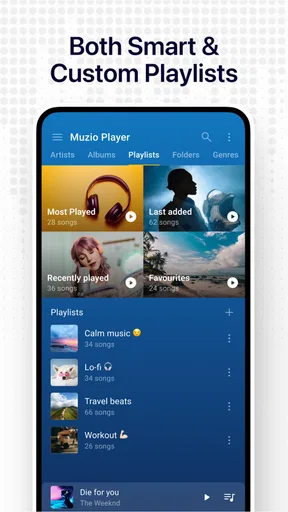
For a more considered setup, I’d make a few purpose-based playlists rather than one enormous queue: one for a short walk, another for concentration, and one for a longer journey. Reordering tracks is useful when the sequence matters, such as easing into a workout or keeping quieter songs together for a late evening. A small playlist is also easier to scan and edit on a phone than a large library, which can reduce the amount of precise tapping needed when I’m in a hurry.
The app’s music-cutter function, reflected in its store summary, may appeal if you want to work with a short portion of a track rather than only play a whole song. I would treat that as a separate, deliberate task: choose the source file carefully, make the edit while you can focus on the screen, then listen back before relying on the result. That workflow is less convenient than a one-tap playback action, but it can be useful for someone organizing local audio rather than browsing a streaming catalogue.
Where it fits among music apps
Compared with a streaming-first app, this player’s main advantage is the direct relationship with music stored on your phone. You are not depending on a catalogue search or an online connection to play those files. The trade-off is that you have to bring the collection yourself and keep it organized. Compared with the basic audio controls built into a phone, the appeal here is the combination of library browsing, playlists, sound adjustment, and background listening in a dedicated music app.
I would choose a streaming service instead if discovery is the point of listening for you, or if you do not want to source and maintain audio files. I’d also consider the phone’s built-in player if you only listen occasionally and do not need extra organization or equalizer controls. This app makes more sense when you regularly return to a personal library and want to shape how it sounds. Its current version is 7.6.2, and the app is rated for Everyone; those details make it approachable in broad terms, but they do not tell me whether every control will suit a particular person’s vision, hearing, or dexterity.
Cost, expectations, and who should pass
The app is free to install, with in-app purchases ranging from $0.99 to $49.99 per item. I’d look carefully at any purchase screen before confirming anything and decide whether the extra option addresses a need I actually have. A free starting point lowers the barrier to trying it, but it is still sensible to check what is included before treating every feature as cost-free. The app has an average rating of 3.6 from around 2.1 million ratings, with roughly 46,000 written reviews, and has passed 100 million installs. Those figures suggest a widely used player with mixed reactions, not a promise that it will fit every library or device.
It is likely to suit people who already have MP3s or other supported audio files, want offline playback, and appreciate having playlists and sound controls close at hand. It may be a poor match if you expect a ready-made music catalogue, rely on highly visible controls, or find repeated on-screen selection uncomfortable. In that case, a simpler built-in player, voice-led controls, or a streaming app designed around your preferred way of interacting may be a better choice. I would test a small set of tracks first rather than reorganizing an entire collection before I know the interface works for me.
Interface and Usability
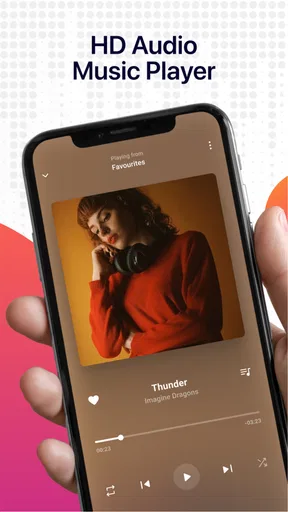
First things first, the moment you open the Music Player - MP3 Player, you’re greeted with an intuitive and clean interface. It doesn’t bombard you with unnecessary ads or clutter, which is always a win in my book. Navigating through your music collection feels like a breeze. You can easily sort your tracks by albums, artists, or even create your own playlists.
The design is minimalistic, yet it offers just the right amount of customization. If you’re like me and love tinkering around, you’ll appreciate the customizable themes and backgrounds. You can switch up the look to match your mood or even the genre of music you’re listening to.
Audio Quality and Features
Now, let’s talk about the most important aspect – audio quality. The app supports a wide variety of audio formats, so whether you have MP3s, WAVs, or even FLAC files, you’re covered. The sound quality is top-notch, offering clear and crisp audio that makes your music come alive.
One feature I found particularly impressive is the built-in equalizer. It’s got a bunch of presets for different music genres, but you can also tweak it to your liking. Whether you’re into heavy bass or smooth jazz, you can adjust the sound to perfection. Plus, the bass booster is a nice touch for those who like their music with a bit more oomph.
Playlist Creation and Management
Creating playlists is as easy as pie. Just select your favorite tracks, hit the create button, and voila! You’ve got your personalized playlist ready to go. The app also offers smart playlists based on your listening habits, which is super handy if you’re not sure what to listen to next.
Managing your playlists is just as straightforward. You can add or remove tracks with a few taps and reorder them as you see fit. It’s all about giving you control over your music experience.
Offline and Background Play
One of the standout features of the Music Player - MP3 Player is its offline play capability. Once you’ve downloaded your music to your device, you can listen to it anytime, anywhere, without worrying about data usage or connectivity issues. This is a lifesaver for long flights or road trips.
And, of course, you can enjoy your music in the background while using other apps. Whether you’re surfing the web or scrolling through social media, your tunes won’t skip a beat.
Final Verdict
In conclusion, the Music Player - MP3 Player is a fantastic addition to any music lover’s app collection. It combines a sleek design with powerful features, ensuring that you get the best music experience possible. Whether you’re a casual listener or an audiophile, this app has something to offer.
So, if you’re on the hunt for a reliable and versatile music player, give this one a try. It’s like having your own personal DJ, ready to play your favorite tracks at the touch of a button. Happy listening!
Pros
- User-friendly interface with intuitive controls.
- Supports a wide range of audio formats.
- Offers customizable equalizer settings.
- Offline playback available for downloaded music.
- Minimal ads for an uninterrupted experience.
Cons
- Limited free version features.
- No lyrics support for songs.
- Occasional bugs with playlist management.
- Frequent updates can be intrusive.
- Some features locked behind a paywall.
FAQs for Muzio I Music Player & MP3 App
What audio formats does the Music Player - MP3 Player support?
The Music Player - MP3 Player supports a wide range of audio formats, including MP3, WAV, AAC, FLAC, and more. This ensures compatibility with most of your music files, allowing you to enjoy a seamless listening experience without worrying about converting your files.
Can I customize the interface of the Music Player - MP3 Player?
Yes, the Music Player - MP3 Player offers various customization options. You can change themes, adjust the layout, and even select different equalizer settings to suit your audio preferences. This means you can personalize the app to match your style and enhance your user experience.
Does the Music Player - MP3 Player work offline?
Absolutely, the Music Player - MP3 Player is designed to work offline. Once your music files are downloaded onto your device, you can listen to them anytime, anywhere without needing an internet connection. This makes it a great choice for users who want music on the go.
Is there a built-in equalizer in the Music Player - MP3 Player?
Yes, the app features a built-in equalizer with multiple preset options to enhance your listening experience. You can also manually adjust the settings to fine-tune the audio output according to your preferences, ensuring that you get the best sound quality possible.
How does the Music Player - MP3 Player handle playlists?
The app allows you to easily create, manage, and edit playlists, giving you full control over your music libraries. You can add songs by genre, artist, or mood, and the intuitive interface makes navigation and playlist organization simple and efficient.


